DOCUMENT CAMERA · iOS & ANDROID
The facts, burned into the photo.
Foto Notes stamps your note, the date, time and GPS location into the picture as you take it. Nothing to edit afterwards, nothing that can be removed — the proof is in the image.
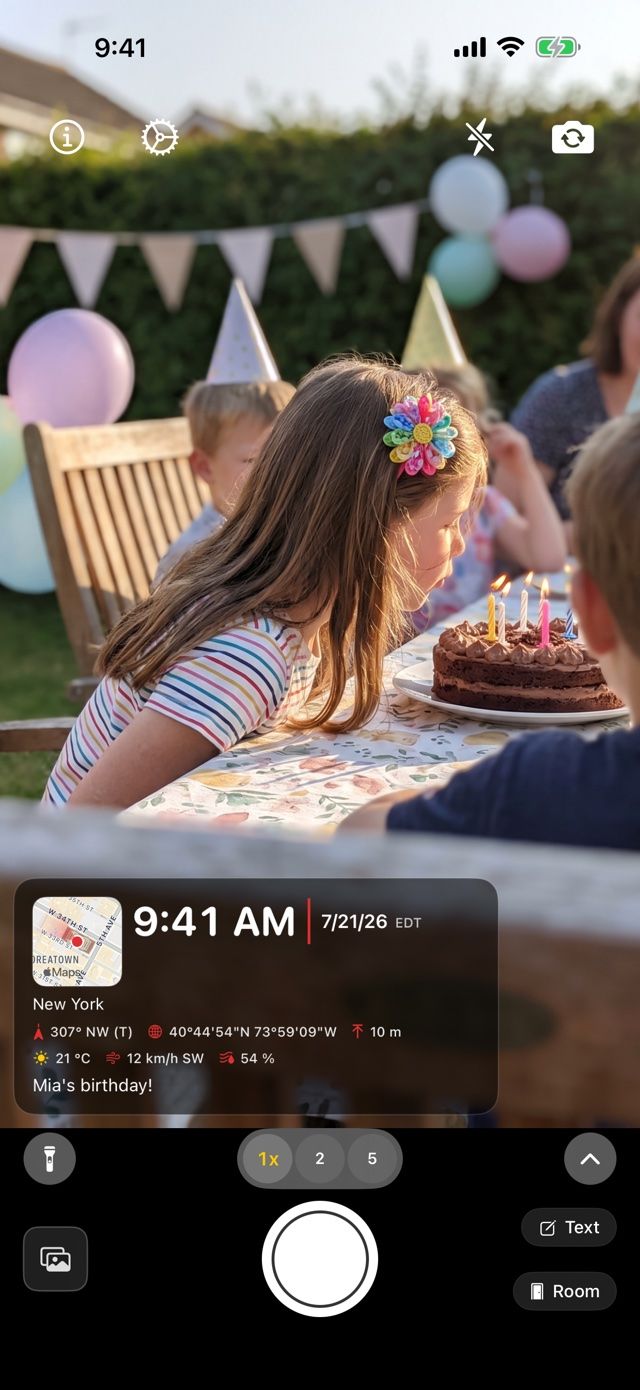
What you see is what gets burned in
The live preview shows the finished photo before you take it. When you press the shutter, the text becomes part of the image — permanent, on every copy, in every app.
- Step 1
Set up your note once
You compose the note a single time. Date, time and location then fill in automatically and stay current, so there is nothing to type before each shot.
- Step 2
Check the live stamp
The camera shows the finished info card in real time: big clock, date, full address, a small map — even compass direction and altitude if you want. Hold the stamp to show or hide any element.
- Step 3
Capture — the text stays in the image
The text is embedded in the pixels of the photo. It cannot be cropped away by accident, stripped by a messenger, or edited later.
The values the stamp fills in automatically
Live values, straight from the camera — updated the moment you press the shutter.
Made for days with hundreds of photos
When every picture has to prove where and when it was taken — and what it shows.
Apartment viewings
Before each shot you pick the matching room from the room list. Three viewings later it is still clear which bathroom belongs to which apartment.
Read the guide →Construction sites
Progress photos with date, time and coordinates burned in. The values stay in the image, even after it has been forwarded several times.
Read the guide →Inspections & handovers
Damage, meter readings, serial numbers: these details sit in the photo itself instead of in a separate list that drifts out of sync.
Trips worth remembering
Place and capture time are written into the picture itself — years later it is still clear where a photo was taken.
Foto Notes Pro
For everyone who documents for a living — as a subscription or a one-time lifetime purchase, no forced subscription. Your first 3 photos after installing show the full Pro stamp.
- A small map of your position in the stamp — standard, or satellite on iPhone and iPad
- Weather in the stamp — temperature, wind and humidity at the moment you shoot
- Your logo, company name and website on every photo — instead of the Foto Notes badge
- Style the stamp freely: transparency, colors, corner — or above/below the photo so nothing is covered
- Video with the stamp burned live into every frame (iPhone and iPad, version 2.3 or later)
- Stamp existing photos, with date and location from their capture data (EXIF)
- Work time report from check-in mode as PDF or CSV (your first report is free)
- Your own room list, freely editable
- Save photos directly to iCloud Drive (iPhone and iPad)
- Write your note into the EXIF metadata too
Frequently asked questions
Short answers from the developer — more detail in the blog.
›Can the text be removed from the photo afterwards?
No. The text is burned into the pixels of the image at the moment of capture, so it stays on every copy and in every app. The photo itself is the proof. If you also want machine-readable data, Foto Notes Pro can write your note into the EXIF metadata in addition. (Applies to the stamp on the photo; placed above/below the picture or written only to EXIF, it remains easily removable.)
›Do stamped photos hold up with insurers, landlords or in court?
Whether a court, an insurer or an authority accepts a photo is always decided case by case, and no app can guarantee that. Foto Notes does not promise it either. What the app does is make your documentation as traceable as possible. Date, time down to the second, GPS coordinates, altitude, compass direction and the full street address are burned into the pixels at the moment you press the shutter, not added afterwards. The live preview shows exactly what will be burned in before you shoot. Afterwards the stamp is visible on every copy, survives messenger compression, and cannot be removed without visibly altering the image. In everyday practice, that combination is what makes stamped photos usable as supporting evidence for apartment handovers, damage reports, construction and inspection records, and wherever you need to show conclusively where and when a picture was taken.
›What can the stamp show?
Everything a documentation photo needs, as a structured info card: a large clock with seconds, date and timezone, the full street address, exact GPS coordinates in degrees/minutes/seconds, altitude and compass direction (true or magnetic north, your choice). Pro adds a small map of your position (standard or satellite) and the weather at the moment of capture (temperature, wind and humidity). Your free note and your company branding come on top. Every element can be shown or hidden individually; hold the stamp in the camera and toggle exactly what your report needs. The live preview always shows what will be burned in; nothing else ends up on the photo.
›Where do the date, time and location come from?
Straight from your phone’s clock and GPS sensors at the moment you press the shutter, and nothing is typed in or added later. In the viewfinder the clock ticks live down to the second, and address and coordinates update as you move; what you see is exactly what gets burned in. The compass direction comes from the built-in sensors, the altitude from GPS. Because the facts are captured together with the image, photo and data can never drift apart, and since the stamp cannot be edited afterwards, the values in the picture are always the values of the moment of capture.
›Does Foto Notes work offline?
Yes. Date, time, exact GPS coordinates, altitude, compass direction and your note all work without any internet connection. On a remote job site or in a basement without reception, the stamp still carries the full position data. Only three things need a network: resolving coordinates into a readable street address, plus the map thumbnail and the live weather (both Pro). If you are offline, the exact coordinates are still burned in, so the location remains verifiable even when no address could be looked up.
›What does Foto Notes cost?
The app is free, with no ads, unlimited photos and the full documentation stamp. Free photos carry a small Foto Notes badge inside the stamp. Foto Notes Pro replaces that badge with your own logo, company name and website, and unlocks the map and live weather in the stamp, free styling and placement above or below the photo, EXIF comments, and saving to iCloud Drive on iPhone and iPad. Pro comes as a subscription or a one-time lifetime purchase, with no forced subscription. And you can try everything first: your first 3 photos after installing carry the full Pro stamp, so you know exactly what you are buying before you decide.
›Is there a Foto Notes login? Do I need an account?
No, there is no login and no account, neither in the app nor on this website. Foto Notes deliberately has no user accounts, no sign-up and no cloud backend of its own: your photos stay with you, in your photo library or your own cloud storage, and all settings live on your device. So if you searched for a “Foto Notes login”, there is simply nothing to sign in to; that search usually points to a different product. Purchases (Foto Notes Pro) run entirely through your Apple ID in the App Store; tapping “Restore purchases” in the app is all you ever need, no password from us involved.
›Where are my photos stored?
On your device, in the normal photo library, where stamped photos appear right next to your other pictures and are part of your usual backups. On iPhone and iPad, Pro can additionally save them to your own iCloud Drive. There is no Foto Notes server and no account: photos, notes and location data are never uploaded to us or shared with third parties, and there is nothing to sign up for. Camera and location permissions are used exclusively for taking the photo and embedding the position, and the app contains no ads and no tracking.
›Which languages and devices are supported?
Foto Notes runs on iPhone and iPad with iOS 16.6 or later, and on Android phones and tablets with Android 8 or later. It is fully localized in 28 languages, including English, German, Spanish, French, Italian, Polish, Romanian, Danish, Norwegian, Japanese, Korean and Chinese (Simplified). The stamp follows your language and regional formats, so dates, times and addresses look the way your clients expect them. Both versions are native apps; there is no web app. Video recording is currently available on iPhone and iPad only (version 2.3 or later).
A camera that records the facts with the photo
Free on the App Store and Google Play. Fully localized in 28 languages. Your photos stay on your device or in your own cloud — never on our servers.